


RESOURCES / BLOG / NEWS
Announcement: The VidSense Resource Center Is Live
Contents
What the Resource Center is
VidSense's Resources section is live at katman.fun/resources. Grouped under the "Resources" entry in the top menu, it opens without an account and comes in two languages (Türkçe / English). The idea is to put a layer of knowledge next to the tool: explain platform rules from a creator's point of view, offer content-production guides and teach how to read VidSense's results correctly.
The landing page points to five sections under "Pick a topic": Policy Center, Content Guides, Growth & Analysis, VidSense Academy and Help Center. The Blog and the FAQ open from the same menu. Below sit the featured guides and a most-read list.
This is a launch announcement. In every section the first entry is open in full, the other titles are listed and are being filled in one by one. What is ready today is written out section by section below.
Policy Center
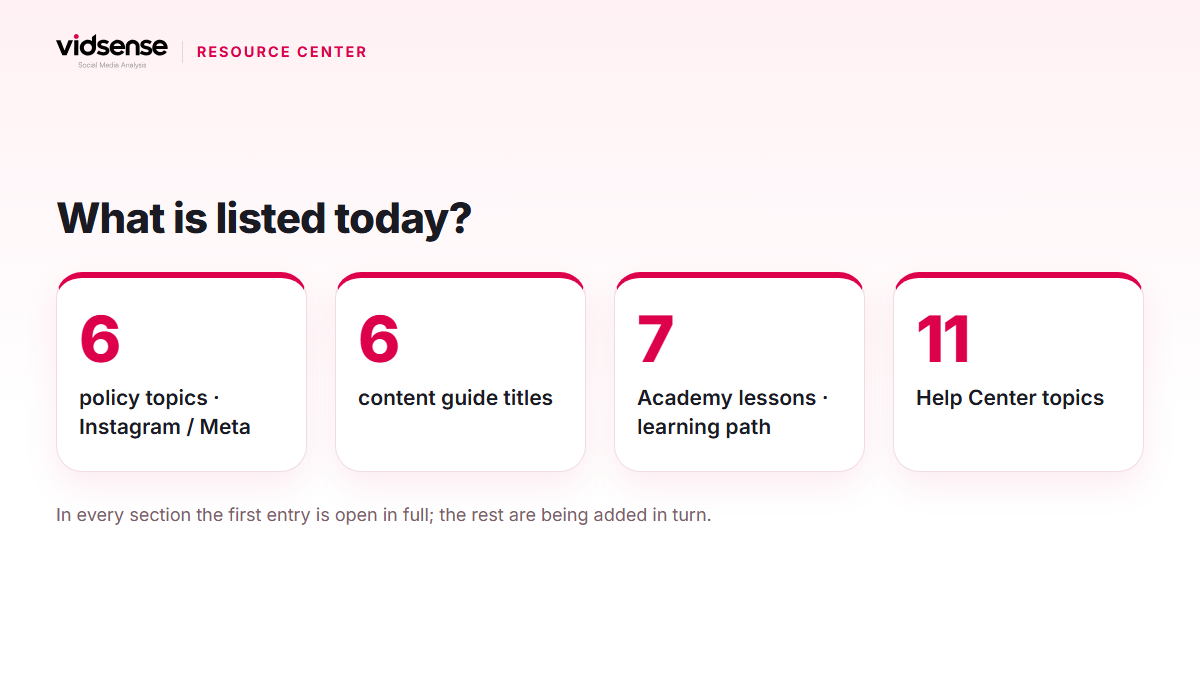
The Policy Center covers platform rules in plain language. The active platform today is Instagram / Meta; TikTok and YouTube are listed as "coming soon". There are six policy topics: safety and harm, harassment and bullying, misleading claims, copyright and usage rights, sensitive content, spam and engagement.
Every topic entry has three parts: what the rule means, context and examples, and the official link with its review date. Today the "Misleading claims" entry is open in full: the rule in plain language, why it matters, possible risk signals, context and exceptions, and how Content Check looks at it. The entries for the other five topics are being prepared.
The most visible line on the page is a caveat: "A VidSense risk signal ≠ an official platform decision." The whole Resource Center keeps that distinction; the potential risk and review suggestion is VidSense's interpretation, and any official account status comes from the platform.
Content Guides
Content Guides collects practical guides from hooks to CTAs and from Reels pacing to the pre-publish check, browsable with the Reels, Hook, Caption, CTA, Video Flow, Visual Storytelling, Content Ideas and Pre-Publish filters. Six titles are listed; today "How do you build a strong hook in the first 3 seconds?" can be read in full: say the promise first, think about visuals and text together, try three alternatives, measure the result, and a practice task at the end. The guides on pacing, the pre-publish check, CTAs, low-performance analysis and captions have their place in the list; their texts are being added.
VidSense Academy
VidSense Academy offers a learning path of short lessons that teach the product step by step: getting started, the first account analysis, Content Check, understanding the VidSense Score, interpreting Policy Risk results, and more. Today the lesson "Run your first account analysis" is open; in four steps it covers starting a preview by username, reading the first signals, seeing the data scope and choosing one action. The other lessons open in turn.
Help Center and FAQ
The Help Center is set up with eleven topics: getting started, account and sign-in, connected social accounts, account analysis, content check, VidSense Score, policy risk check, AI Studio, plans and billing, privacy and data, technical issues. The first article, "Can I analyze an account without connecting it?", is live with a short answer and steps; the category articles are being added.
The FAQ gives short answers under account and data, analysis tools, policy and membership. Some answers are in place (for example that a policy risk signal is not an official decision, that the raw video is deleted after analysis, and that only Instagram is supported right now); others still carry a "being prepared by the content team" note. We are not hiding that; the page is updated as the answers land.
Blog
The Blog publishes in five categories: Growth & Analytics, Content, Policy, Product, News. Every post has a Turkish and an English version, and the post page has a table of contents and a language switch. The first posts are live, and new ones are being added.
How to use it
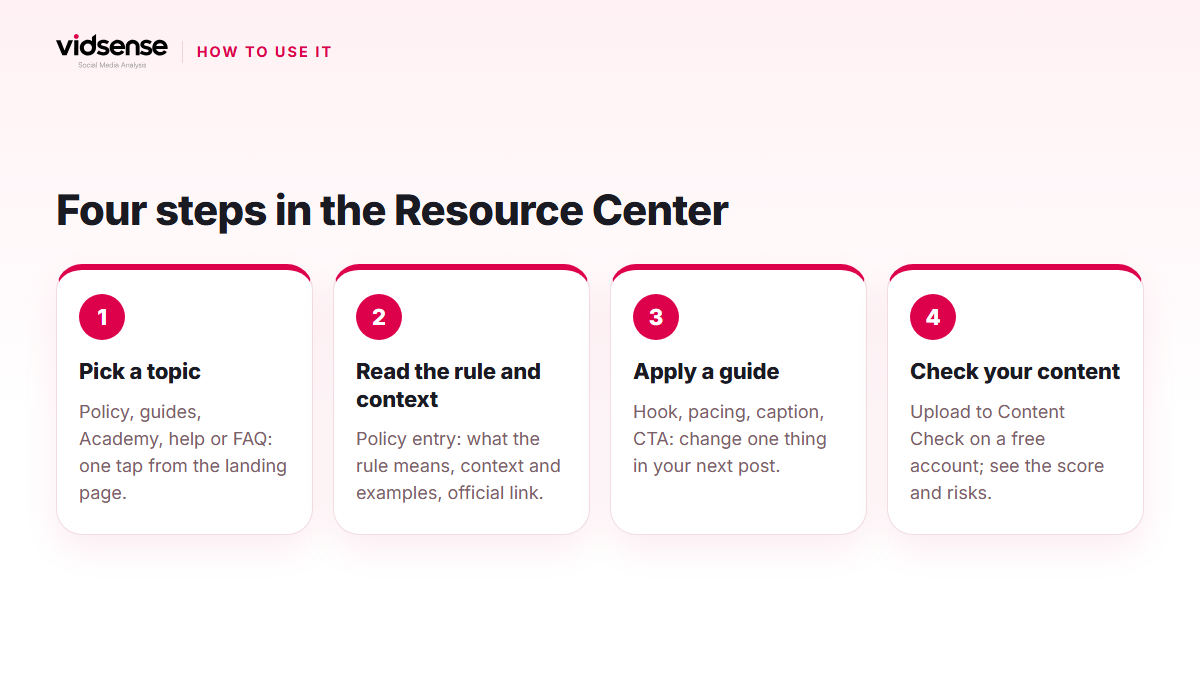
- If a phrase gives you pause before you post, read the relevant topic in the Policy Center first, then run the content through a check.
- When engagement drops, go back to guides such as "How do you analyze low-performing content?" and look at the whole set of signals, not one metric.
- New to VidSense? Start with the first Academy lesson; the result screens get easier to read.
- When something gets stuck, look in the Help Center and the FAQ; if you cannot find it, the support link is at the bottom of the page.
Check it with VidSense
The Resource Center is for learning; Content Check is for applying it. Create a free account, then upload a Reel or photo to Content Check and see in one result how the rules and guides you read play out in your own content. Policy signals show possible risk; they are not an official Meta decision.
Contents
Check your content before you post it.
Use Content Check to see potential risk signals before you publish.
Check your content →Keep reading
News · 5 min read
Announcement: The Redesigned VidSense Panel and First-Login Flow
VidSense's panel went live with its new design on 30 September 2026: a new sidebar and top bar, a first-login flow, Content Check and result screens, and Settings. Here is what works today and what comes later.
October 19, 2026
Product · 5 min read
Removal Risk, Reach Risk, Legal Risk: VidSense's Risk Tiers
Every risk card in VidSense carries a tier label: Removal risk, Reach risk or Legal risk. This post explains how the three tiers map to how Instagram actually enforces its rules, with neutral examples and the effect on your score.
October 18, 2026
Policy · 5 min read
Music and Copyright in Reels: Which Audio Is Safe to Use?
Licensed music, original audio and the Sound Collection are not the same thing in Reels. Here is which audio shows up for which account type, what happens when a track is muted later, and how to stay on the safe side, with official sources.
October 17, 2026