


RESOURCES / BLOG / PRODUCT
Removal Risk, Reach Risk, Legal Risk: VidSense's Risk Tiers
Contents
Why one "risk" label is not enough
Not every problem on Instagram leads to the same outcome. Some content falls under the Community Standards and can be removed; some stays up but is not recommended in Explore and Reels; some concerns not the platform but Turkish advertising and consumer regulation. Showing all three under the same "medium risk" label hides which fix is urgent.
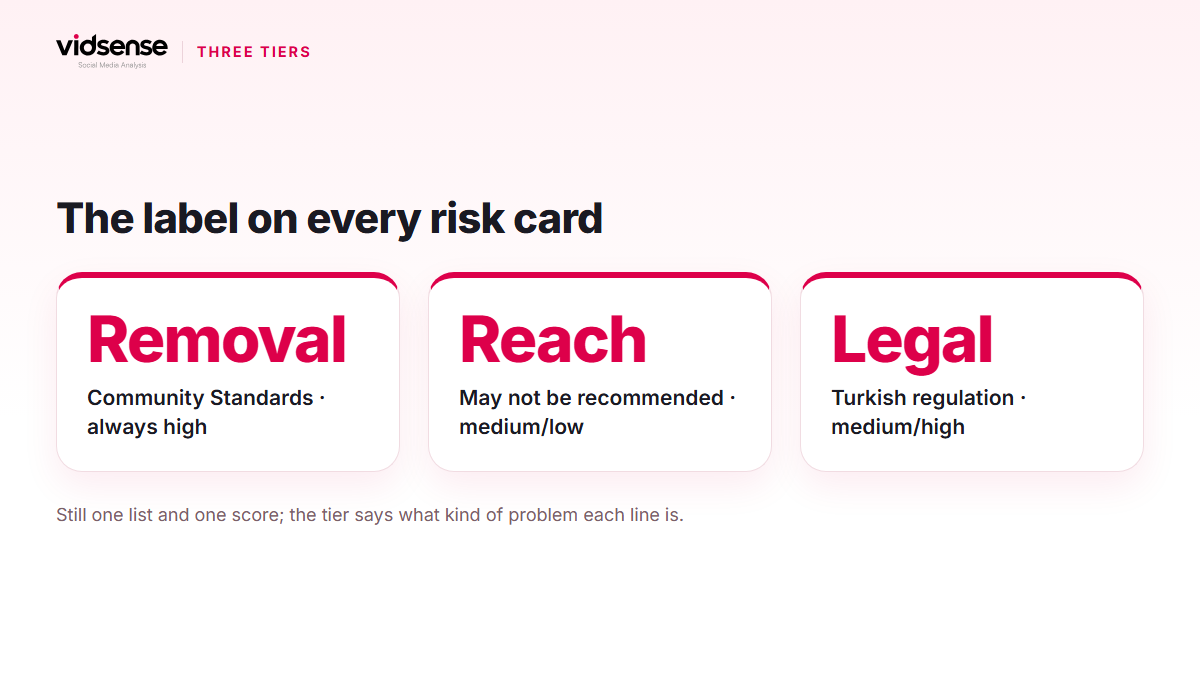
That is why every risk card in VidSense carries a tier label: Removal risk, Reach risk or Legal risk. The result is still a single one: one score, one decision line and one risk list. The tier sits above each line in the list and explains in one sentence what kind of problem that line is.
Removal risk
When a phrase reads as a ban under Meta's Community Standards, the card gets the "Removal risk" label. This tier is always high level, because Instagram can remove this kind of content and the account can receive a strike; removed content is listed on the Account Status screen.
Neutral examples: a miracle claim paired with a commercial offer for a weight-loss product, such as "10 kilos in a week, guaranteed, order now"; selling followers or likes; a "guaranteed returns" promise; an offer to sell prescription-only medicine or weapons; a direct threat. The card's note reads "Instagram can remove this kind of content under its Community Standards; edit before publishing." It never says "will be removed" or "banned", because the final decision is Meta's.
Reach risk
The content can stay up, but under Instagram's Recommendation Guidelines it may not be shown in Explore, Reels and suggested posts, or may reach fewer people. Instagram says this plainly: content that is not eligible for recommendation can still be posted and remains visible to followers, but does not surface in discovery areas. This tier is medium or low level; it is never high.
Neutral examples: engagement bait such as "tag 3 friends" or "double tap if you agree"; reposts marked "repost", "via @" or carrying a visible third-party watermark; an exaggerated health claim without a commercial offer; an ominous phrase with no target. The card's note matches: "The content can stay up but may not be recommended in Explore/Reels and may reach fewer people."
Legal risk
This tier points not at the platform but at Turkish regulation: the Ministry of Trade's guide for social media influencers, the burden of proof in Law No. 6502, the health-claim rules for food and supplements, the Capital Markets Board's warnings on investment advice, and the ban on advertising illegal betting. The level is medium or high.
VidSense applies this label only when two conditions hold together: the text is clearly commercial, and the type of product or service is clear from the text. If the product type is unclear, no legal risk is produced. Neutral examples: a caption promoting a third-party brand with a discount code but no #ad or #reklam-style disclosure; a sentence stating the amount or speed of weight loss for a food supplement, such as "5 kilos in 2 weeks"; an unproven "100% effective" claim. The card's note says "add or change the label/wording"; the suggestion is concrete.
What is not a risk
The tier model earns its keep mostly by making clear what is not a risk. A personal experience ("I lost 6 kilos in 3 months, here is my routine"), balanced claims with a caveat such as "results vary from person to person", and sensitive words in a historical, news, educational or idiomatic context produce no risk. A word like "death" or "war" is never flagged on its own; the meaning of the sentence is what gets assessed.
How the tier moves the score
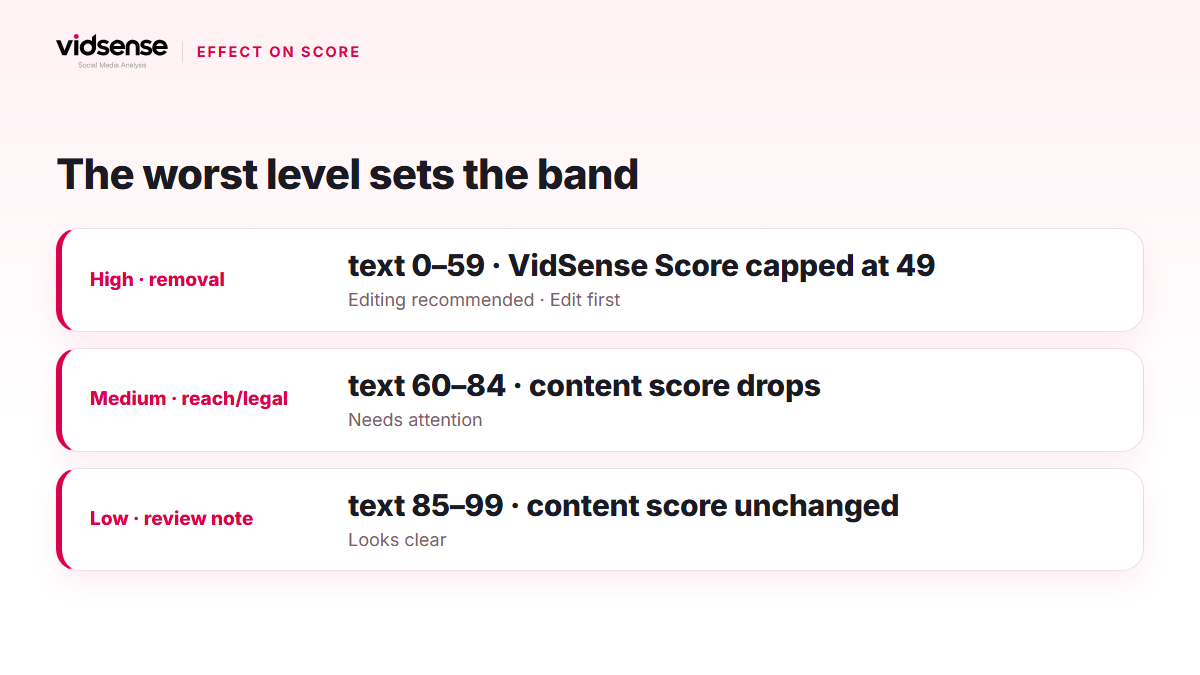
The worst level sets the score band. In Text Check, any high-level risk (a removal-class reading or a high legal risk) pins the score to the 0–59 band and the "Editing recommended" verdict; a worst level of medium gives 60–84 "Needs attention", a worst level of low gives 85–99 "Looks clear", and no risk gives 100. In Content Check, a high-level risk caps the VidSense Score at 49 and the badge becomes EDIT FIRST; a medium-level risk pulls the score down; a low-level risk leaves the score unchanged.
In both checks, the card shows the level, the tier label with its one-line note, the quote, the reason and a safer alternative; if you think a flag is wrong, the "This flag is wrong" button records your feedback. The Risks tab in Content Check also shows the source (speech, on-screen text, caption or visual), the time range and a "Review the topic" link to the Policy Center. On the Free plan, Content Check shows the number of risks and the highest level; card details open on Creator and above.
Check it with VidSense
Paste your caption into Text Check and see the tier, reason and suggested alternative for every flagged phrase. For a video or photo, the Risks tab in Content Check carries the same labels. No account yet? Create a free one. Policy signals show possible risk; they are neither an official Meta decision nor legal advice.
Source: Meta's Community Standards, Instagram's Recommendation Guidelines and Account Status pages; the Turkish Ministry of Trade's guide for social media influencers.
Contents
Check your content before you post it.
Use Content Check to see potential risk signals before you publish.
Check your content →Keep reading
Product · 5 min read
How to Read Your VidSense Score: Overall Score, Sub-Scores and Bands
The VidSense Score is one number, but six sub-scores and a decision badge sit behind it. This guide explains how the bands are set, what each sub-score measures and where to start when a score comes in low.
October 13, 2026
Product · 4 min read
How to Run a Pre-Publish Content Check with VidSense
VidSense's Content Check reviews your text, image, or video before you publish, surfacing risk labels and safer alternatives. Here's how it works, step by step.
October 9, 2026
News · 5 min read
Announcement: The Redesigned VidSense Panel and First-Login Flow
VidSense's panel went live with its new design on 30 September 2026: a new sidebar and top bar, a first-login flow, Content Check and result screens, and Settings. Here is what works today and what comes later.
October 19, 2026